New: Split long documents into separate sources with Casey
NEW
You can now ask the AI assistant to pull pages out of a long document and save them as their own sources.
How it works
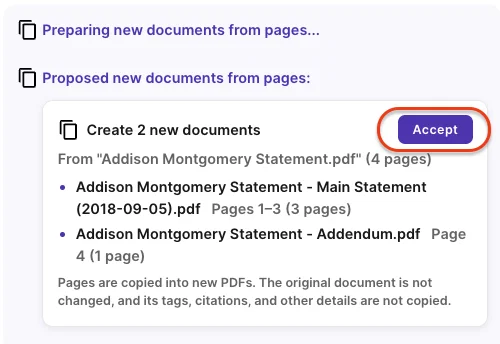
Tell the assistant which pages you want pulled out, for example, "split exhibits A through D into their own documents." It will propose up to 20 new documents, each with a name and a page range. Check the proposal and click Accept. The new sources are created in the background, and the chat links you to each one when it's ready.
Good to know
- Your original document stays exactly as it was. Each split creates a brand-new PDF source.
- Scanned pages stay searchable. Pages that were already OCR'd keep their text in the new source, and page layouts such as landscape pages are preserved.
- New sources start fresh. Tags, citations, review status, custodian, dates, and Bates numbers are not copied over. Each new source includes a note recording its original document and page range.
- New sources appear at the top level of your case, not nested under the original.
- Page ranges are flexible. You don't need to cover every page, and ranges can overlap if you want the same page in more than one new document.
- Splitting works on processed, paged documents only. Emails, spreadsheets, audio and video files, archives, depositions and produced copies can't be split. The assistant will tell you if a document isn't eligible.
- Document limits apply. New sources count toward your case's document limit on plans that have one.